
Explore MediaCollect on GitHub
MediaCollect started as a narrower Chrome extension for downloading videos from X. The folder on my machine is still called TwitVidDown, which records that earlier idea more honestly than the final product name.
I used Gemini 3.8 Flash in Google Antigravity to build it. By version 1.2.0, the project had grown into two tools that share one popup: an X and Threads video downloader, and a screenshot suite that works on the active web page.
That combination could easily have become a loose collection of buttons. The more interesting part of the experiment was getting the two jobs to feel like one small browser utility, then testing the parts that only become visible on a busy, changing social feed.
What Gemini Built
MediaCollect is a Manifest V3 extension written in plain HTML, CSS, and JavaScript. There is no framework or build step in the runtime code. The repository contains a service worker, two content-script layers, the popup, shared utilities, and a separate screenshot studio.
The video side supports x.com, twitter.com, threads.net, and threads.com. It can:
- Detect MP4 video variants exposed by X and Threads.
- Add a download control directly to supported posts.
- List detected videos in the extension popup.
- Preview a clip and choose among the available resolutions and bitrates.
- Search the current results by author, handle, or post text.
- Filter for HD variants and short clips.
The screenshot side has four capture modes: a dragged selection, a chosen DOM element, the visible viewport, or an entire page assembled from scrolling captures. The editor adds crop, pen, highlighter, arrows, boxes, text, undo, zoom, pan, clipboard copy, and PNG export. A capture can also be opened in its own Studio tab, which makes it possible to keep several edits open at once.
The initial commit already contained 6,798 lines across the extension, documentation, and store material. The current main source files and manifest total about 7,600 lines. Those numbers are not a measure of quality, but they show the breadth Gemini attempted in the first pass.
How Video Detection Works
The implementation uses two content-script contexts. A script in the page's main JavaScript world watches network responses from fetch and XMLHttpRequest for video metadata. An isolated content script handles DOM scanning, post controls, and communication with the rest of the extension.
That separation matters on modern social sites. The useful media variants can appear in GraphQL responses before the visible page has settled, while the buttons have to survive a virtualized feed whose post elements are continually added, removed, and reused. A MutationObserver performs incremental scans, and the service worker keeps a deduplicated per-tab video list in session storage.
For X, the extension also has a syndication fallback when the page data does not provide enough author or media information. Before displaying anything in the popup, it escapes text and checks media URLs against an allowlist of browser-safe protocols.
The Popup Under Load
The supplied example below is more useful than an empty product mockup. It shows MediaCollect on a real X feed with 173 videos detected.

The popup uses a bone-white, neumorphic interface with blue controls. The first quarter is reserved for the header, mode switch, search, filters, scan control, and result count. The remaining space is a scrollable list of video cards. Each card keeps the thumbnail prominent, puts the author and post text beside it, and places the quality selector next to the download button.
This layout was not the first version. The commit history shows a concentrated run of small corrections: separating preview from download, adding search, changing the popup to a 25/75 vertical split, moving the quality controls under the text, and scrolling a newly opened preview fully into view.
The sequence is a good record of where browser-extension work becomes specific. Generating a convincing popup was quick. Making it comfortable with a long list of real posts required repeated observation and adjustment.
The Scroll-To-Post Problem
One feature received more attention than its size suggests. Clicking a video's text in the popup can take the user back to the matching post in the X feed and briefly highlight it.
The first implementation needed several repairs. The extension tried a direct lookup, then a broader search, then a fallback based on the post link. That still had to account for X's virtual DOM: a post that was previously detected may no longer exist in the currently mounted part of the feed.
The final approach incrementally scans the X feed and scrolls toward the match without navigating away. The same behavior was disabled on Threads after testing showed that the X-specific assumptions did not transfer reliably. I prefer that outcome to keeping a cross-platform feature that only works some of the time.
Screenshots Stay Local
The screenshot tools use chrome.tabs.captureVisibleTab and Canvas 2D. Full-page capture temporarily controls scrolling, records overlapping viewport slices, and stitches them into one canvas. Edits and temporary Studio buffers are kept in extension storage, and finished images are copied to the clipboard or saved directly by the browser.
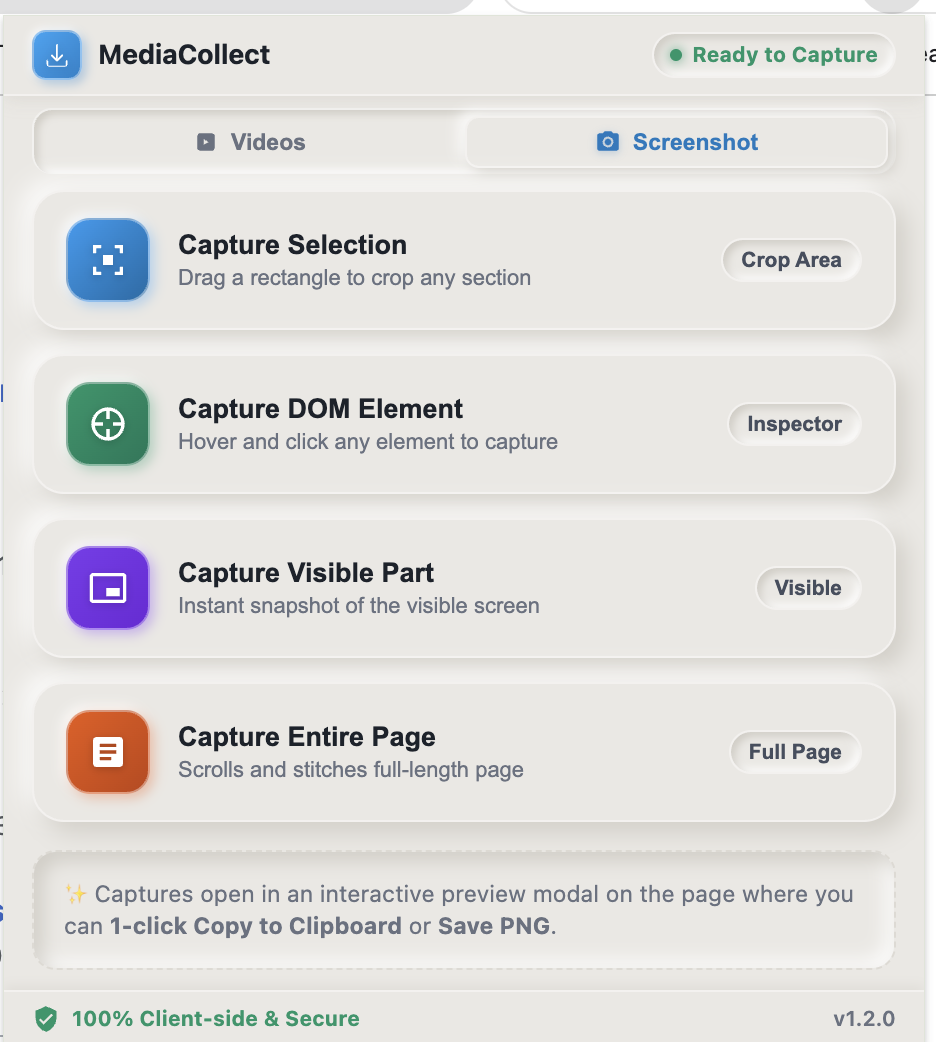
There is no analytics or remote processing service in the repository. Video metadata is read from the supported pages, and downloads go from the platform's media CDN to the local Downloads folder. The manifest permissions are still substantial—downloads, storage, tabs, active-tab access, and scripting—so the repository includes a plain-language justification for each one in its Chrome Web Store notes.
The current package is prepared for Chrome Web Store submission, but the repository should be treated as source and an unpacked extension unless a public store listing is linked later.
What I Checked
For this write-up, I checked every JavaScript file with Node's syntax checker and verified the packaged MediaCollect-v1.2.0.zip archive. Both checks passed. I also reviewed the manifest, permission notes, current interface, and the full commit sequence.
There is no automated test suite in the repository yet. Syntax and archive checks are useful release hygiene, but they do not prove that extraction will keep working when X or Threads changes its responses or DOM. The most important testing for this kind of extension remains repeated use on live feeds, with different post shapes and enough scrolling to exercise virtualization.
Overall Impression
Gemini 3.8 Flash produced a surprisingly broad first version in Antigravity: two media workflows, a custom interface, browser integration, a canvas editor, documentation, privacy copy, and store-submission material.
The follow-up work was concentrated in the parts a static code review would be least likely to settle: author identity in inconsistent response objects, card proportions with real content, preview behavior inside a constrained popup, and navigation back into a virtualized feed. The final commits are mostly evidence of looking at the tool in use and correcting what felt wrong.
That is my main takeaway from this build. A fast model can now produce most of a useful extension from a compact idea. The remaining work is less about filling empty files and more about watching the browser carefully. MediaCollect became convincing when the generated breadth was followed by small, concrete corrections against the live environment it was meant to handle.